 selan.ai
Docs · MCP connections
MCP connections for Claude Code and Claude Desktop
These are the MCP servers Selan can connect Claude to, with the host each one reaches. An owner switches a connector on, and each developer signs in to it as themselves.
How do MCP connections work?
- An owner switches the connector on under Connections in Selan. Every connector starts off. A few need something from you first, and the page asks for it: an OAuth client you create for Google, the address of your Outline, the bot and chat Telegram posts with, or Slack's Add to Slack (or your own Slack app's token).
-
Each developer picks where it runs on their own Connections page: Claude Desktop, the
Claude CLI or both. Desktop starts on and the CLI starts off. The connector appears the
next time they start that app. For the CLI, Selan adds it to
~/.claude.jsonand removes it again if the company switches it off. - The first time they use it, developers sign in as themselves, so their own permissions apply and Selan never holds their account. Owners can see what is offered, but not who has signed in.
Most connectors are the provider's own MCP server on the provider's own host. Selan runs
the ones on mcp.selan.ai: its own two, and providers that have no hosted
server or none Claude can sign in to directly. Reactor remote agents use the same catalog
and sign in the same way (see Selan MCP).
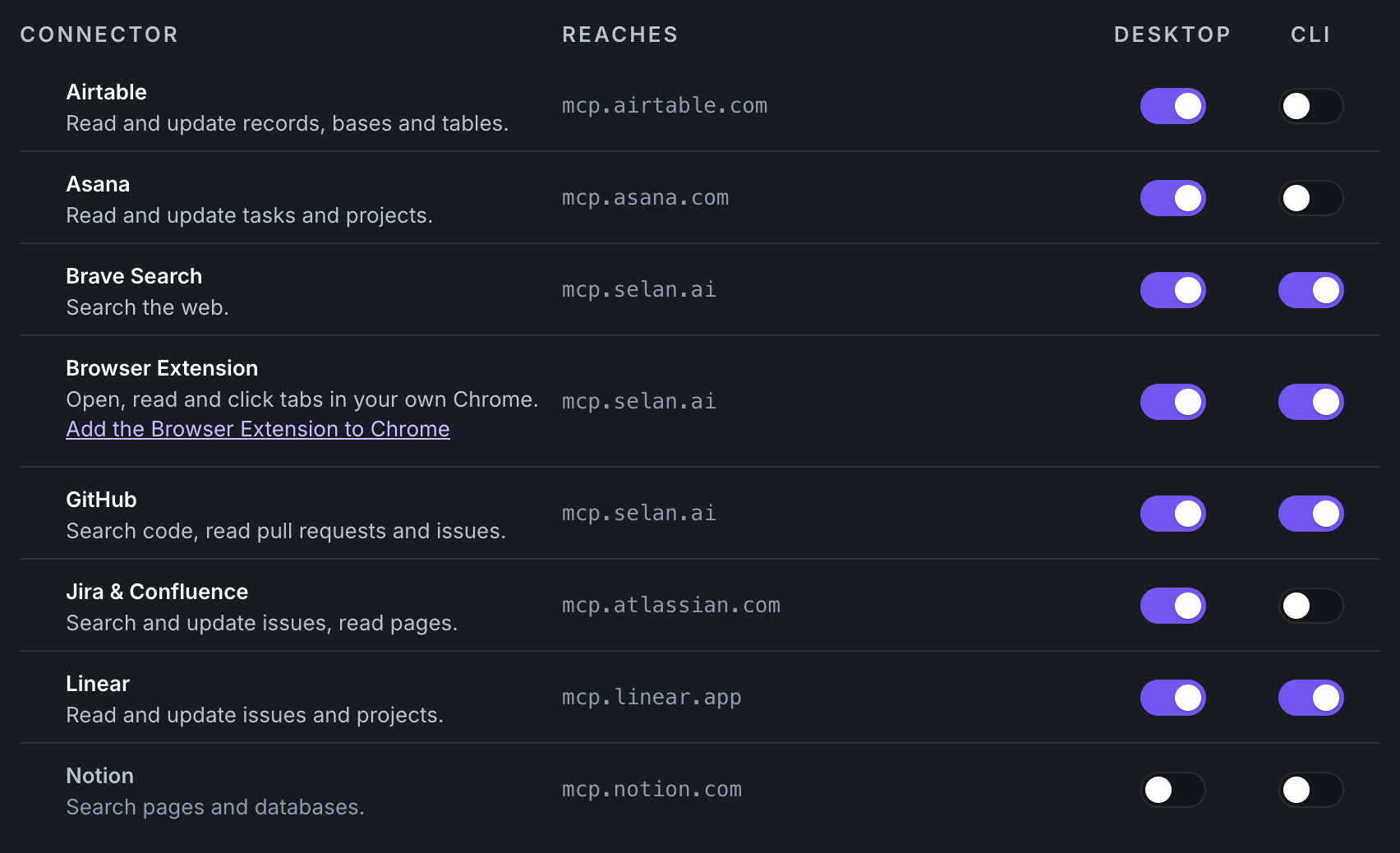
Which MCP servers can Claude connect to?
The Sign-in column says how a developer authenticates. OAuth means the provider's own sign-in page. Selan sign-in means the developer's Selan session is enough.
Code and engineering
| Connector | What it does | Reaches | Sign-in |
|---|---|---|---|
 GitHub GitHub | Search code, read pull requests and issues. | mcp.selan.ai | OAuth |
 GitLab GitLab | Search code, read merge requests and issues. | mcp.selan.ai | OAuth |
 Sentry Sentry | Read issues, events and releases. | mcp.sentry.dev | OAuth |
 Datadog Datadog | Read metrics, logs, monitors and incidents. | mcp.datadoghq.com | OAuth |
 Vercel Vercel | Read projects, deployments and logs. | mcp.vercel.com | OAuth |
 Supabase Supabase | Read projects and logs, and run queries. | mcp.supabase.com | OAuth |
 Neon Neon | Read projects and branches, and run queries. | mcp.neon.tech | OAuth |
 Cloudflare observability Cloudflare observability | Read Workers logs, errors and analytics. | observability.mcp.cloudflare.com | OAuth |
| Cloudflare bindings | Read and manage Workers, KV, D1 and R2. | bindings.mcp.cloudflare.com | OAuth |
| Cloudflare Radar | Read internet traffic, routing and outage data. | radar.mcp.cloudflare.com | OAuth |
| Cloudflare API | Call the whole Cloudflare API with your own access: DNS, Workers, R2, Zero Trust. | mcp.cloudflare.com | OAuth |
 Hostinger Hostinger | Manage domains, DNS, VPS and hosting. | mcp.hostinger.com | OAuth |
| Connector | What it does | Reaches | Sign-in |
|---|---|---|---|
 Gmail Gmail | Search, read and draft mail. | workspace-mcp.selan.ai | Your own OAuth client |
 Google Calendar Google Calendar | Read and manage calendars and events. | workspace-mcp.selan.ai | Your own OAuth client |
 Google Drive Google Drive | Search, read and organise files. | workspace-mcp.selan.ai | Your own OAuth client |
 Cloud Logging Cloud Logging | Search log entries, buckets and views. | logging.googleapis.com | Your own OAuth client |
| Cloud Monitoring | Read metrics, alerts and dashboards. | monitoring.googleapis.com | Your own OAuth client |
| Cloud Run | Read services and their revisions. | run.googleapis.com | Your own OAuth client |
| BigQuery | Read datasets and tables, and query them. | bigquery.googleapis.com | Your own OAuth client |
 Firebase Firebase | Firestore, Remote Config, Auth, Crashlytics, Functions and messaging in Firebase. | mcp.selan.ai | Your own OAuth client |
| Cloud SQL | Query PostgreSQL databases, read-only. | sqladmin.googleapis.com | Your own OAuth client |
 Google Search Console Google Search Console | Read search performance, sitemaps and URL inspection for your sites. | mcp.selan.ai | Your own OAuth client |
 Google Analytics Google Analytics | Run standard and realtime reports on your properties. | analyticsdata.googleapis.com | Your own OAuth client |
| Google Analytics Admin | Find accounts and properties, and read their data streams and custom definitions. | analyticsadmin.googleapis.com | Your own OAuth client |
Projects, docs and design
| Connector | What it does | Reaches | Sign-in |
|---|---|---|---|
 Jira & Confluence Jira & Confluence | Search and update issues, read pages. | mcp.atlassian.com | OAuth |
 Linear Linear | Read and update issues and projects. | mcp.linear.app | OAuth |
 Notion Notion | Search pages and databases. | mcp.notion.com | OAuth |
 Asana Asana | Read and update tasks and projects. | mcp.asana.com | OAuth |
 monday.com monday.com | Read and update boards and items. | mcp.monday.com | OAuth |
 ClickUp ClickUp | Read and update tasks, docs and spaces. | mcp.clickup.com | OAuth |
 Trello Trello | Read and update boards, lists and cards. | mcp.trello.com | OAuth |
 Airtable Airtable | Read and update records, bases and tables. | mcp.airtable.com | OAuth |
 Outline Outline | Search the wiki, read and write documents. | Your own Outline | OAuth |
 Miro Miro | Read and create boards and board items. | mcp.miro.com | OAuth |
 Figma Figma | Read files, frames and design tokens. | mcp.figma.com | OAuth |
 Canva Canva | Search designs and create them from templates. | mcp.canva.com | OAuth |
 Webflow Webflow | Read and update sites, pages and CMS items. | mcp.webflow.com | OAuth |
Messages and meetings
| Connector | What it does | Reaches | Sign-in |
|---|---|---|---|
 Slack Slack | Read channels and post as your own Slack bot. | mcp.selan.ai | Your own bot |
 Telegram Telegram | Send your team a message in one Telegram chat. | mcp.selan.ai | Your own bot |
 Intercom Intercom | Read conversations and contacts. | mcp.intercom.com | OAuth |
 Fireflies Fireflies | Search meeting transcripts and summaries. | mcp.fireflies.ai | OAuth |
 Granola Granola | Search meeting notes and transcripts. | mcp.granola.ai | OAuth |
Product analytics and marketing
| Connector | What it does | Reaches | Sign-in |
|---|---|---|---|
 PostHog PostHog | Read events, insights and feature flags. | mcp.posthog.com | OAuth |
 Amplitude Amplitude | Query charts, events and cohorts. | mcp.amplitude.com | OAuth |
 Mixpanel Mixpanel | Query events, funnels and retention. | mcp.mixpanel.com | OAuth |
 Braze Braze | Read campaigns, Canvases and segments. | mcp.braze.eu | OAuth |
Payments, finance and people
| Connector | What it does | Reaches | Sign-in |
|---|---|---|---|
 Stripe Stripe | Read payments, customers and subscriptions. | mcp.stripe.com | OAuth |
 Square Square | Read payments, orders, catalog and customers. | mcp.squareup.com | OAuth |
 PayPal PayPal | Read invoices, orders and transactions. | mcp.paypal.com | OAuth |
 Pleo Pleo | Read expenses, cards and invoices. | mcp.pleo.io | OAuth |
 HiBob HiBob | Read people, time off and org data. | mcp.hibob.com | OAuth |
Selan and the web
| Connector | What it does | Reaches | Sign-in |
|---|---|---|---|
 Selan Selan | Read spend, credentials, members, models and settings. | mcp.selan.ai | Selan sign-in |
| Browser Extension | Open, read and click tabs in your own Chrome. | mcp.selan.ai | Connect in Chrome |
 Brave Search Brave Search | Search the web. | mcp.selan.ai | Selan sign-in |
 Zapier Zapier | Run Zaps and reach the apps they connect. | mcp.zapier.com | OAuth |
Missing a tool your team uses? Write to info@selan.ai.
Slack
Slack lets Reactor agents read Slack and post in it as your company's own bot, never as a person. It works in Slack Connect channels too.
Add to Slack (recommended)
In Connections → Slack, click
Add to Slack — install the Selan app and approve. Once installed, the button reads
Reconnect Slack. Then /invite @Selan Agents into each channel
agents should use.
Or use your own Slack app
Under the button, open Use your own Slack app instead.
-
Open api.slack.com/apps → Create New App → From a
manifest, pick your workspace, paste the manifest below, then Create.
display_information: name: Selan Agents description: Selan's remote agents read and post here as your company's bot. features: app_home: home_tab_enabled: false messages_tab_enabled: true messages_tab_read_only_enabled: true bot_user: display_name: Selan Agents always_online: true oauth_config: scopes: bot: [chat:write, chat:write.customize, reactions:write, channels:history, groups:history, im:history, mpim:history, im:write, im:read, mpim:read, channels:read, groups:read, users:read, users:read.email] settings: org_deploy_enabled: false socket_mode_enabled: false token_rotation_enabled: false - Click Install to Workspace → Allow.
-
Copy the Bot User OAuth Token (OAuth & Permissions, it starts
xoxb-) and the Signing Secret (Basic Information → App Credentials), paste both under Connections → Slack, and save. Selan checks them with Slack and keeps them encrypted; no developer or agent ever holds them. - In Slack,
/invite @Selan Agentsinto each channel agents should use.
Using an existing app instead? It needs the scopes above, chat:write.customize for agent
names, and the Messages Tab on for DMs. Then reinstall it.
What a post looks like
The sender is the agent's name, like Kepler Deploy, shown with the
chat:write.customize scope. The body is Markdown. Under it is one footer line:
Posted by Kepler Deploy for @person · run, linking the run that sent it. A person's own post
shows Posted by @person.
Tools
slack_post_message: post in a channel, or reply in a thread. Pass a user ID (U…) as the channel to DM that person.slack_update_message: replace the text of the agent's own post.slack_delete_message: delete the agent's own post.slack_add_reaction: add an emoji reaction.slack_remove_reaction: remove the bot's reaction.slack_read_channel: a channel's recent messages, oldest first, with names and times.slack_read_thread: a thread, its first message then the replies.slack_read_dm: the bot's direct messages with the person the run acts for.slack_find_user: find a person by exact email, or by a name fragment, and get their user ID.slack_user_info: one person by user ID: name, title, timezone, whether a bot.slack_find_channel: find a channel the bot can see by a name, topic or purpose fragment, or by exact#name.slack_channel_info: one channel by ID: name, privacy, whether the bot is in it, member count, topic and purpose.
Limits
- The bot works only in channels it has been invited to.
- Sending DMs needs the app's Messages Tab on, or Slack refuses with
messages_tab_disabled. - There is no message search: Slack does not allow it with a bot token.
- An agent can edit or delete only its own posts.
Jira & Confluence
Before a Reactor agent can sign in to Jira & Confluence, an admin of your Atlassian organization must allow Reactor once. Atlassian's MCP server signs in only to addresses the organization allows, and Reactor's is not on its default list. Claude Code and Claude Desktop are, so developers need nothing.
Until then, Atlassian's sign-in page says Access to this domain is restricted and Accept stays greyed out.
Allow Reactor
- An admin of your Atlassian organization opens admin.atlassian.com and picks the organization.
- Go to Rovo → Rovo MCP server and, under Your domains, click Add domain.
- Enter
https://reactor.selan.ai/api/connectors/callbackand click Add.
Then sign the agent in again: Connect on its Connectors page in Reactor,
or open the link that selan_remote_agent_connector_connect returns. Atlassian's own
steps are in
Control Atlassian MCP server settings.